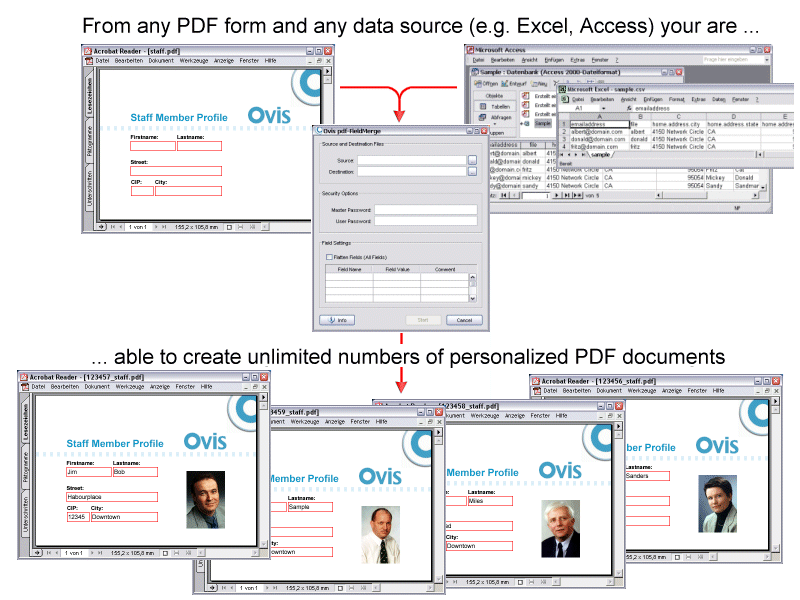
Fill in PDF forms automatically (Version 13.x - OS: Windows XP or later, MacOSX 10.5 or later. Linux on request.)
With some few mouse clicks you fill in PDF form fields with pdf -FieldMerge pdf -FieldMerge
Process data from FDF/XFDF, a database, a spreadsheet or a csv file to your
PDF form - singularly or en masse - automatically or manually. Without
any programming or some special IT know-how. pdf -FieldMerge
pdf -FieldMerge
Create a workflow that automatically provides user with a
(confirmation) PDF. Streamline mail-merge letters via PDF! Call up pdf -FieldMerge
Using Adobe's extended rights management allows PDF
forms with special rights, as appropriate, including the local store in
Adobe Reader. Changing these forms may result, however, that the PDF
form is rendered unusable. For example, in an automated filling the PDF
form from the outside pass. pdf -FieldMerge
For a free trial version (demo will create a watermark), please
click here... or
the download column on the left.
Features: +++ merges variable data with pdf
forms +++ merges csv file with pdf forms +++ merge graphics +++
makes it easy to use pdf forms +++ uses
files from spreadsheets, PC databases, or custom mainframe queries +++ save to single or multiple PDFs +++ export pdf form field names +++ partial flattening +++
export form field names +++ Export of all
entries as a FDF file or XFDF +++ 100 %
Adobe kompatible +++ Support of Adobe's
extended rights management +++ Reference
table +++ supports ISO character sets for
CSV data +++
Please ensure to use form templates created with 100% compatible PDF
forms software (e.g. Adobe Acrobat©, pdf-Office Professional) to avoid problems. (Dynamic XFA documents do not conform to the PDF standard and are currently not supported. Contact our Support
Graduated prices (quantity = price per seat) :
1 = $116.50 ($97.90) 5 = $104.72 ($88.00) 10 = $98.18 ($82.50) 25 = $85.09 ($71.50) 50 = $72.00 ($60.50)
Available Options:
Download:
Windows - Version 13 Mac OSX - Version 13